Quick Summary: Bitget supports crypto deposits (free), fiat deposits via card/P2P/bank transfer, and crypto withdrawals with network-based fees. The standout advantage over most exchanges: USDT withdrawal via TON chain is completely free — $0 fee. This guide covers every deposit and withdrawal method available in 2026 — with step-by-step instructions, a complete fee table, KYC limit breakdown, and the most common mistakes to avoid.
1. Bitget Deposit & Withdrawal: What You Need to Know First
Bitget is one of the world’s largest cryptocurrency exchanges, recognized particularly for its copy trading and derivatives products, with over 100 million registered users globally as of 2026. Whether you are funding a new account or cashing out your profits, understanding how money flows in and out of Bitget is essential before you make your first transaction.
Here are the three most important things to understand upfront:
Bitget charges no platform deposit fee for on-chain crypto transfers. When you send cryptocurrency from another exchange or wallet, Bitget does not add a deposit fee on its end. You pay only the network fee from the sending side — typically $1 or less if you use BEP-20 or TRC-20.
Bitget has a standout feature for USDT withdrawals: the TON chain costs $0. This is rare among major exchanges in 2026. Bybit, OKX, and Binance all charge at least $1 for USDT withdrawals on their cheapest networks. If your destination wallet or exchange supports TON-based USDT, always use it.
KYC is now mandatory for deposits and trading on Bitget. As of January 1, 2024, Bitget requires identity verification to access core platform features including crypto deposits, trading, and withdrawals. Unverified accounts are limited to 20,000 USDT per day in withdrawals — completing KYC raises this to 3,000,000 USDT per day.
2. Before You Start: Checklist
Before initiating any deposit or withdrawal on Bitget, confirm the following:
Account requirements:
- Bitget account registered and logged in
- Email or phone verification completed (required at registration)
- KYC verification completed (mandatory for deposits and trading as of January 2024)
- 2FA (Two-Factor Authentication) enabled — required for all withdrawals
For deposits:
- Know which coin and network you will send
- Have the correct Bitget deposit address ready (generated fresh in the deposit window)
- Confirm minimum deposit amounts (varies by coin and network)
For withdrawals:
- Confirm funds are in your Spot Account (not Futures Account or Earn Account)
- Confirm the destination address supports the network you plan to use
- Check whether the coin requires a Tag/Memo (XRP, XLM, EOS, ATOM, TON require this)
- Note: Bitget enforces a 24-hour withdrawal freeze after any security setting changes (password reset, 2FA change, new device login)

3. How to Deposit on Bitget: All Methods
Bitget supports four primary deposit methods. Each has different costs, speeds, and regional availability. Here is a detailed breakdown of each.
Method 1: Crypto Transfer (Cheapest)
Transferring cryptocurrency from another exchange or wallet directly to Bitget is the most cost-effective funding method available. Since Bitget charges no deposit fee on its end, you pay only whatever withdrawal fee the sending exchange charges — which on BEP-20 (Binance Smart Chain) or TRC-20 (Tron) is typically a flat $1 or less.
Why this method wins on cost:
If you transfer $10,000 in USDT via TRC-20, your total cost is around $1. If you used a credit card to buy directly on Bitget, you would pay 2–8% on the same amount — a difference of $200 to $800.
Step-by-step: How to deposit crypto on Bitget
- Log in to your Bitget account
- Click Assets (top right on web) → Deposit
- Select the coin you want to deposit (e.g., USDT)
- Select the network you will be sending from (e.g., TRC-20)
- Copy the deposit address displayed — this is your Bitget receiving address
- If your coin requires a Tag/Memo (XRP, XLM, ATOM, TON), copy that separately
- Go to your sending exchange or wallet
- Initiate a withdrawal to that address, selecting the exact same network
- Wait for blockchain confirmations to complete
Required confirmations by network (approximate):
| Network | Confirmations Required | Typical Arrival Time |
|---|---|---|
| BEP-20 (BSC) | 15 | 30–60 seconds |
| TRC-20 (Tron) | 20 | 1–3 minutes |
| TON | 1 | Under 1 minute |
| Solana | 1 | Under 30 seconds |
| Optimism | 32 | 1–2 minutes |
| Arbitrum One | 15 | Under 1 minute |
| ERC-20 (Ethereum) | 12 | 3–15 minutes |
| Bitcoin (BTC) | 1 | 10–60 minutes |
Critical warning: Always generate your deposit address fresh within the Bitget deposit window each session. Do not reuse addresses from old screenshots. If you accidentally send to the wrong network, contact Bitget support immediately with the transaction hash (TXID) — recovery is possible for common misrouted deposits, though it may take several business days and a recovery fee may apply.
Method 2: Credit / Debit Card
Bitget’s Buy Crypto section allows you to purchase cryptocurrency instantly using Visa, Mastercard, Apple Pay, or Google Pay through third-party payment providers such as Banxa and Simplex.
This is the fastest way to fund your account — funds typically arrive within minutes — but it is the most expensive method due to processor fees. The total cost ranges from 2% to 8% of the amount purchased, depending on your card type, region, and the provider used at checkout. The exact amount you will receive is displayed before you confirm.
Step-by-step: How to buy crypto via card on Bitget
- Log in to Bitget
- Click Buy Crypto → One-Click Buy
- Select the cryptocurrency you want to receive (USDT, BTC, ETH, etc.)
- Enter your spending amount in your local fiat currency
- Select your payment method (Visa, Mastercard, Apple Pay, Google Pay)
- Review the exact rate, fee, and amount you will receive at checkout
- Complete the provider’s verification if required (ID may be needed on first use)
- Crypto is credited to your Bitget account within 5–15 minutes
Note: The minimum card purchase amount on Bitget is $15, and the maximum is $10,000 per transaction. Many traditional banks decline crypto-related card transactions. If your card is declined, try Apple Pay or Google Pay, switch cards, or contact your bank to approve the transaction type. Challenger banks (Revolut, Monzo) generally work more reliably than traditional banks for crypto purchases.
Method 3: P2P Trading
Bitget’s peer-to-peer (P2P) marketplace connects buyers and sellers directly, allowing you to purchase cryptocurrency using local payment methods that may not be available through standard fiat channels. Bitget charges no platform fee for P2P trades — the effective cost is the small premium (if any) that the seller sets above the spot price.
P2P is especially useful for users in regions without direct fiat deposit options, or for users who want to fund their account without a card fee.
Supported P2P payment methods (varies by region):
- Bank transfer (local)
- PayPal (selected regions)
- Alipay / WeChat Pay
- UPI / IMPS (India)
- Wise
- Revolut
- GCash (Philippines)
- M-Pesa (Africa)
- Dozens of additional local payment methods depending on country
Step-by-step: How to buy crypto via P2P on Bitget
- Log in to Bitget
- Navigate to Buy Crypto → P2P
- Select the coin (USDT recommended for most use cases) and your fiat currency
- Filter offers by payment method, price per unit, and available limit
- Select a seller and click Buy
- Follow the on-screen payment instructions exactly
- Send fiat payment to the seller’s account via the selected payment method
- Click Payment Sent in the Bitget interface to notify the seller
- Once the seller confirms receipt, Bitget releases the crypto from escrow to your account
Important: Bitget holds the seller’s crypto in escrow throughout the transaction. Never send payment outside the platform-approved channel shown in the P2P window. Never mark payment as sent before actually paying. Bitget cannot recover funds lost to P2P fraud where the buyer paid via unauthorized channels.
Method 4: Bank Transfer / SEPA (EU Only)
For users in the European Economic Area (EEA), Bitget supports fiat deposits via SEPA bank transfer in EUR through its partner payment providers. SEPA is one of the most cost-efficient deposit methods for EU users — the platform fee from Bitget is minimal, and SEPA standard transfers are often free from the sending bank.
Important SEPA deposit requirements specific to Bitget:
- You must place a deposit order on Bitget first before transferring funds. Transfers made without a corresponding order will not be processed.
- The transfer amount must exactly match the amount specified in your Bitget deposit order. Any discrepancy will cause the deposit to fail.
- The name on your bank account must exactly match your Bitget verified name. Transfers from joint accounts are not accepted.
- SEPA supports personal accounts only — institutional or corporate accounts may be rejected.
- SWIFT is not recommended for EUR deposits. SWIFT transfers may be rejected or incur additional fees of approximately $10.
Step-by-step: Bank transfer deposit
- Log in to Bitget
- Go to Assets → Deposit → select Fiat
- Select EUR (or your supported local currency)
- Select Bank Transfer
- Place your deposit order on Bitget and note the exact amount
- Copy the payee details shown: account name, IBAN, SWIFT/BIC, bank name, bank address
- Initiate the SEPA transfer from your bank app using the exact amount and reference code
- SEPA deposits typically credit within 1–3 working days. Transfers made after 5:00 PM local time or on weekends/holidays process on the next working day.
Supported fiat currencies for bank deposits on Bitget: EUR, USD, BRL, PLN, HUF, CZK, DKK, AUD, CAD, NOK, SEK, CHF, VND, ZAR.
4. Bitget Deposit Fees: Complete Table 2026
| Deposit Method | Platform Fee (Bitget) | Third-Party Fee | Speed |
|---|---|---|---|
| Crypto transfer (on-chain) | Free | Network fee from sender (~$0.15–$1) | 30 sec – 60 min |
| Credit / debit card | Free | 2–8% (provider) | 5–15 min |
| P2P trading | Free | 0–2% (seller premium) | 5–30 min |
| SEPA bank transfer (EU) | Free | Minor provider fee (if any) | 1–3 business days |
| Apple Pay / Google Pay | Free | 2–5% (provider) | 5–15 min |

5. How to Withdraw from Bitget: Step-by-Step
Withdrawing from Bitget means sending your cryptocurrency to an external wallet, another exchange, or a self-custody hardware wallet. The process is straightforward, but the network selection step is where irreversible errors most commonly happen. Follow these steps carefully.
Step 1: Make Sure Funds Are in Your Spot Account
This is the step many new users miss. Bitget uses multiple internal account types:
- Spot Account: The main account for holding assets. Withdrawals can only be initiated from here.
- Futures Account (USDT-M, Coin-M, USDC-M): Holds margin for derivatives trading. Funds must be transferred out before withdrawing.
- Earn Account: Where staking, savings, and PoolX/LaunchPool holdings accumulate. These may have lock-up periods.
- Copy Trade Account: Funds in active copy trades cannot be withdrawn until the position is closed.
How to transfer to your Spot Account:
- Go to Assets → Transfer
- Set From: (Futures Account, Earn Account, or other)
- Set To: Spot Account
- Enter the amount and click Confirm
This is a free, instant internal transfer.
Step 2: Navigate to the Withdrawal Page
- Log in to Bitget (web or app)
- On web: click Assets (top right) → Withdraw
- On mobile app: tap Assets → Withdraw
Step 3: Select Coin and Network
- In the Coin field, search for and select the cryptocurrency you want to withdraw (e.g., USDT)
- In the Network field, select the blockchain network for the transfer
This is the most critical step in the entire withdrawal process. The network you select on Bitget must match the network that your destination wallet or exchange supports for that coin. Sending USDT via ERC-20 to a wallet that only shows TRC-20 addresses — or vice versa — can result in permanently lost funds that cannot be recovered.
Before selecting a network, always verify with your destination exchange or wallet documentation which networks they officially support for that specific coin. Bitget displays the exact fee for each network in the selection dropdown — compare before choosing.
Step 4: Enter Withdrawal Address and Tag/Memo
- Paste your destination wallet address into the Address field
- If the coin requires a Tag/Memo, enter it in the dedicated field
Coins that require a Tag/Memo:
- XRP (Ripple) — requires Destination Tag
- XLM (Stellar) — requires Memo
- EOS — requires Memo
- ATOM (Cosmos) — requires Memo
- TON — requires Comment/Memo
- HBAR (Hedera) — requires Memo
Warning: Sending to an exchange address that requires a Tag/Memo without including it will result in your funds arriving at the exchange but not being credited to your specific account. Recovery typically requires a manual support request to the destination exchange and can take days to weeks.
For transfers to another Bitget user, use the Internal Transfer feature instead — it is free and instant.
Step 5: Enter Amount and Confirm
- Enter the withdrawal amount
- Review the Network Fee and Amount Received displayed below the input
- Click Submit
- Complete 2FA verification (Google Authenticator or SMS)
- For large amounts, Bitget may send an email confirmation link — check your inbox and click to approve within the validity window
Track your withdrawal status in Assets → History → Withdrawal:
| Status | Meaning |
|---|---|
| Submitted | Request received, pending review |
| Processing | Approved, being broadcast to the blockchain |
| Completed | Confirmed on-chain, funds delivered |
| Rejected | Declined by Bitget (contact support) |
| Canceled | Canceled by user before processing |

6. Bitget Withdrawal Fees: Complete Network Fee Table 2026
Bitget charges a flat fixed fee per withdrawal — not a percentage of the amount. This means a $100 withdrawal and a $100,000 withdrawal cost exactly the same in absolute terms.
Important: Fees fluctuate based on blockchain network conditions. The figures below reflect standard conditions as of early 2026. Always verify the exact fee in the withdrawal window before confirming.
USDT Withdrawal Fees by Network:
| Network | Withdrawal Fee | Min. Withdrawal | Speed |
|---|---|---|---|
| TON | 0 USDT (FREE) | 1 USDT | Under 1 min |
| Optimism | 0.15 USDT | 1 USDT | 1–2 min |
| BEP-20 (BSC) | 0.20 USDT | 5 USDT | 30–60 sec |
| Polygon | ~0.50 USDT | 5 USDT | 1–3 min |
| TRC-20 (Tron) | 1 USDT | 10 USDT | 1–5 min |
| Solana | 1 USDT | 10 USDT | Under 30 sec |
| Arbitrum One | 1 USDT | 10 USDT | Under 1 min |
| ERC-20 (Ethereum) | ~6 USDT | 20 USDT | 3–15 min |
Major Coin Withdrawal Fees:
| Coin | Network | Withdrawal Fee |
|---|---|---|
| BTC | Bitcoin | ~0.0005 BTC |
| ETH | ERC-20 | ~0.004 ETH |
| ETH | Arbitrum | ~0.0003 ETH |
| XRP | Ripple | ~0.25 XRP |
| SOL | Solana | ~0.01 SOL |
| BNB | BEP-20 | ~0.0008 BNB |
Key insight unique to Bitget: The TON chain USDT withdrawal at $0 fee is one of the most competitive withdrawal options available on any major exchange in 2026. If the destination supports TON-based USDT (OKX, Bybit, and many wallets do), always use TON first. The second and third cheapest options are Optimism ($0.15) and BEP-20 ($0.20). Avoid ERC-20 (~$6) unless absolutely necessary.
7. Bitget Withdrawal Limits by KYC Level
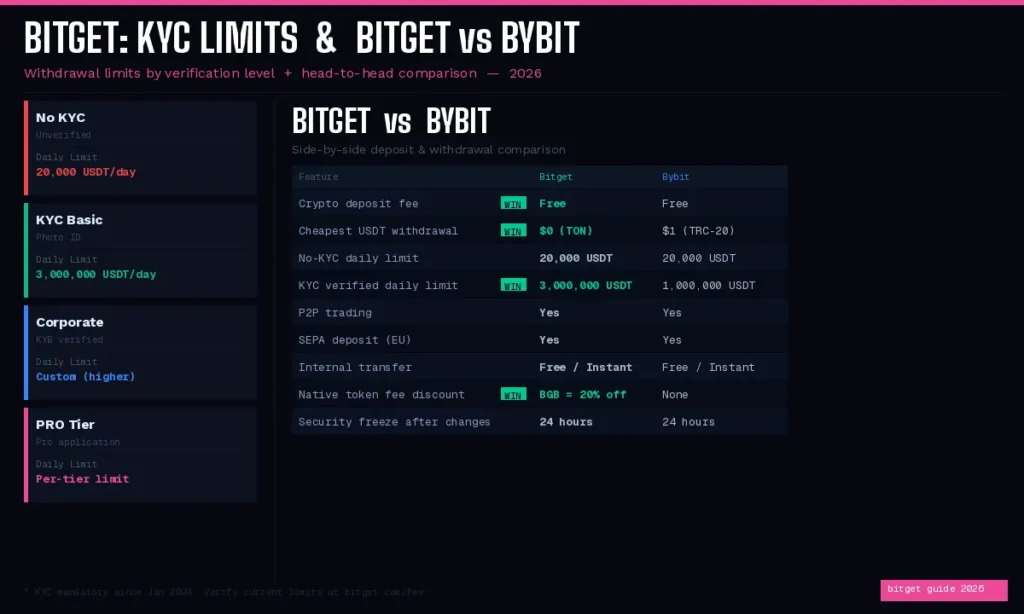
Bitget’s withdrawal limits are tied to your KYC verification level. Since January 2024, completing at least basic KYC is mandatory for deposits and trading — so the unverified limit is essentially only relevant for accounts that have not yet gone through the new mandatory verification process.
| KYC Level | Daily Withdrawal Limit | Monthly Limit |
|---|---|---|
| No KYC (Unverified) | 20,000 USDT | Not specified |
| KYC Verified (Personal) | 3,000,000 USDT | Unlimited |
| Corporate / KYB | Custom (higher) | Unlimited |
| PRO Tier | Per-tier limit set by Bitget | Unlimited |
What KYC verification requires on Bitget:
- Government-issued photo ID (passport, national ID, or driver’s license)
- A live selfie or selfie with the ID document
- KYC review typically completes within 60 minutes
- Email or dashboard notification sent upon approval or rejection
Note: After a password change, 2FA reset, or detection of unusual account activity, Bitget enforces an automatic 24-hour withdrawal freeze as a security measure. This is not an error — it is a deliberate protection that also applies after logging in from a new device for the first time.
8. How to Choose the Right Network (Critical)
Network selection is the single most common cause of permanently lost funds in crypto. Here is a systematic guide to getting it right every time.
The golden rule: The network you select on Bitget must match a network actively supported by your destination. Never select a network based solely on fee — always confirm compatibility first.
Step-by-step decision process:
- Identify your destination (e.g., Binance, Coinbase, MetaMask, Ledger)
- Check the deposit page or documentation of that destination for which networks they support for your specific coin
- From the overlapping supported networks, choose the one with the lowest fee on Bitget’s withdrawal page
- If TON is available and supported on both sides, always choose TON first for USDT
Common network compatibility guide for USDT:
| Destination | Recommended Network | Notes |
|---|---|---|
| Binance | TRC-20 or BEP-20 | Both widely supported |
| OKX | TON (free) or TRC-20 | OKX supports TON |
| Bybit | TON or TRC-20 | Bybit supports TON |
| Coinbase | ERC-20 | Limited TRC-20 support on Coinbase |
| Kraken | ERC-20 or TRC-20 | Verify in Kraken deposit settings |
| MetaMask (default) | ERC-20 | Only sees ERC-20 by default |
| MetaMask (Arbitrum added) | Arbitrum | Must manually add Arbitrum network |
| Trust Wallet | TRC-20 or BEP-20 | Both supported natively |
| TON Wallet / Tonkeeper | TON | Native TON ecosystem |
| Ledger / Trezor | ERC-20 | For Ethereum-based asset management |
| Another Bitget user | Internal Transfer (free) | Free, instant, no network fee |
MetaMask caution: MetaMask by default only shows Ethereum mainnet (ERC-20) assets. If you send BEP-20 or Polygon USDT to a MetaMask address without having added that network in MetaMask settings, the funds are technically in your wallet but invisible until you add the corresponding network manually. This is recoverable, but confusing for new users.
9. Cheapest Way to Deposit and Withdraw on Bitget
Based on the current 2026 fee structure, here is the most cost-efficient deposit and withdrawal path for global users.
Cheapest deposit method:
- Buy USDT on a fiat-supporting exchange (Binance, Coinbase, Kraken) using your local currency via bank transfer or ACH
- Withdraw USDT from that exchange to Bitget via TRC-20 or BEP-20 (whichever is cheaper on the sending exchange — typically $1)
- Total cost: approximately $1 flat, regardless of transfer amount
For a $10,000 deposit, this represents a 0.01% effective rate. Compared to card purchase (2–8%), the savings on a single deposit can exceed $700.
Cheapest withdrawal method:
Use TON chain for USDT — $0 fee. If the destination does not support TON, use Optimism ($0.15) or BEP-20 ($0.20). Avoid ERC-20 (~$6) unless the destination requires it.
Cost comparison: $5,000 USDT transfer
| Method | Cost | Effective Rate |
|---|---|---|
| Crypto via TRC-20 or BEP-20 | ~$1.00 | 0.02% |
| P2P (typical seller premium) | $25–100 | 0.5–2% |
| Credit card (low end) | ~$100 | ~2% |
| Credit card (mid range) | ~$250 | ~5% |
| Credit card (high end) | ~$400 | ~8% |
Withdrawal fee comparison: $5,000 USDT out of Bitget
| Network | Cost |
|---|---|
| TON | $0.00 |
| Optimism | $0.15 |
| BEP-20 | $0.20 |
| TRC-20 | $1.00 |
| ERC-20 | ~$6.00 |
10. How to Withdraw from Bitget to a Bank Account
Bitget does not support direct crypto-to-bank wire withdrawals in most regions outside of the EU. For users who want to convert crypto profits to fiat and move to a bank account, here are the available routes.
Option A: Crypto out → Fiat exchange → Bank (Global method)
This is the standard path used by the majority of Bitget users worldwide.
- Withdraw USDT from Bitget to a fiat-supporting exchange (Coinbase for US/UK, Kraken for EU, Binance globally)
- On that exchange, sell USDT for your local currency (USD, EUR, GBP, KRW, etc.)
- Withdraw the fiat balance to your linked bank account
- Total timeline: approximately 1–3 business days depending on region and bank
The one-way cost is typically under $1 (TON or BEP-20 withdrawal from Bitget) plus any selling spread on the receiving exchange.
Option B: Bitget P2P Sell → Direct Bank Payment
- Go to Buy Crypto → P2P → switch to the Sell tab
- List your USDT or other crypto for sale at your preferred price
- Specify which payment methods you accept (bank transfer, etc.)
- The buyer pays you directly to your bank account via the agreed method
- Once you confirm receipt, Bitget releases the crypto from escrow to the buyer
This eliminates the intermediate exchange step. In markets with good P2P liquidity, you can sell at rates close to or matching the spot price. Zero platform fee is charged by Bitget for P2P trades.
Option C: EU users — Direct SEPA Fiat Withdrawal
For eligible EEA users, Bitget supports fiat withdrawal directly to a bank account via SEPA in EUR and other supported currencies. Navigate to Assets → Withdraw → Fiat to see if your country and currency are supported. SEPA withdrawals typically settle within 1–3 business days.
11. Internal Transfer: Zero-Fee Option Between Bitget Users
If you need to send funds to another Bitget account — a business partner, family member, or your own sub-account — use Bitget’s Internal Transfer. It is completely free and settles instantly, with no blockchain involved.
How to use Internal Transfer:
- Go to Assets → tap the Transfer icon or select Internal Transfer from the withdrawal screen
- Enter the recipient’s Bitget UID, registered email address, or phone number
- Select the coin and amount
- Confirm — funds transfer instantly
There is no withdrawal fee for Internal Transfers. For small amounts especially, this saves disproportionately compared to an on-chain transfer where a flat $1 fee on a $10 transfer represents 10% of the value moved.
12. Bitget vs Bybit: Deposit & Withdrawal Comparison
Both Bitget and Bybit are among the top five global derivatives exchanges. Here is a direct comparison of their deposit and withdrawal features for 2026.
| Feature | Bitget | Bybit |
|---|---|---|
| Crypto deposit fee | Free | Free |
| Cheapest USDT withdrawal fee | $0 (TON chain) | $1 (TRC-20/BEP-20) |
| No-KYC daily withdrawal limit | 20,000 USDT | 20,000 USDT |
| KYC verified daily limit | 3,000,000 USDT | 1,000,000 USDT |
| P2P trading | ✅ | ✅ |
| SEPA bank deposit (EU) | ✅ | ✅ |
| Internal transfer (free) | ✅ Free & instant | ✅ Free & instant |
| 24h security freeze | ✅ After security changes | ✅ After security changes |
| BGB/BIT token fee discount | ✅ 20% off trading fees | ❌ (no equivalent) |
| Spot account withdrawal | Direct from Spot | Must use Funding Account |
Summary: Bitget has a meaningful advantage in withdrawal fees — the TON chain $0 USDT withdrawal is the best in class. Bybit’s limit is higher at the KYC Level 2 tier, but for most individual users, Bitget’s 3,000,000 USDT daily limit with standard KYC is more than sufficient.
13. Bitget Deposit & Withdrawal: Processing Times
| Action | Method | Typical Time |
|---|---|---|
| Deposit | BEP-20 / BSC | 30–60 seconds |
| Deposit | Solana | Under 30 seconds |
| Deposit | TON | Under 1 minute |
| Deposit | TRC-20 | 1–3 minutes |
| Deposit | Optimism / Arbitrum | 1–2 minutes |
| Deposit | ERC-20 (Ethereum) | 3–15 minutes |
| Deposit | Bitcoin | 10–60 minutes |
| Deposit | Credit card | 5–15 minutes |
| Deposit | P2P | 5–30 minutes |
| Deposit | SEPA bank transfer | 1–3 business days |
| Withdrawal | Standard on-chain | 1–5 minutes |
| Withdrawal | High network congestion | Up to several hours |
| Withdrawal | Manual review (large amount) | Up to 24 hours |
| Withdrawal | After security change | 24-hour freeze applies first |
| Internal Transfer | Any coin | Instant |
14. Common Deposit & Withdrawal Errors (And How to Fix Them)
Problem: Deposit not credited after 1+ hours
Possible causes and solutions:
- Wrong network selected: If you sent via a different network than what was shown on Bitget’s deposit page, contact Bitget support immediately with your transaction hash (TXID). Bitget has a recovery process for common misrouted deposits, though it takes time and may involve a recovery fee.
- Insufficient blockchain confirmations: Check the transaction status using the TXID on the appropriate blockchain explorer (BscScan for BEP-20, Tronscan for TRC-20, Etherscan for ERC-20). If the transaction is confirmed on-chain but not credited, submit a support ticket.
- Below minimum deposit amount: Deposits below the network minimum may not auto-credit. Contact support with the TXID.
- Missing Tag/Memo: If you deposited a coin that requires a Tag/Memo (XRP, XLM, TON, ATOM) without including it, contact Bitget support with the TXID. Recovery is possible but requires manual processing.
Problem: “Withdrawal Restricted” message
This is one of the most common issues new users encounter on Bitget. The most frequent causes are:
- KYC not completed — As of January 2024, KYC is required to enable withdrawals. Complete identity verification to resolve this.
- KYC pending review — If your KYC application is submitted but not yet approved, withdrawals are restricted until the review is complete (typically up to 60 minutes).
- 24-hour security freeze — Triggered automatically after password changes, 2FA changes, new device logins, or detected unusual activity. You must wait out the full 24 hours.
- Funds are locked — Check whether your assets are tied up in open P2P orders, active copy trades, staking/Earn products, or trading bonuses that are non-withdrawable.
Problem: Zero balance shown in withdrawal screen
Your funds are in a different account type. Go to Assets → Transfer and move funds from the Futures Account, Earn Account, or Copy Trade Account to your Spot Account first.
Problem: Withdrawal stuck in “Processing” for hours
Check the TXID in your withdrawal history and look it up on the blockchain explorer for the network you used. If the TXID is not visible on the explorer after several hours, the transaction may still be in Bitget’s internal queue — contact support if it exceeds 12 hours.
Problem: Sent to wrong address (external wallet)
On-chain transactions are irreversible once confirmed. Bitget cannot reverse or recover funds sent to an incorrect external address. This is why verifying the destination address character by character before confirming every withdrawal is essential.
Problem: “Invalid address” error when entering withdrawal address
This means the address format does not match the network you selected. For example, entering an ERC-20 address (starts with “0x”) while TRC-20 network is selected will trigger this error, because TRC-20 addresses start with “T”. Either switch to the correct network or re-check the address.
15. Bitget Deposit & Withdrawal: Security Tips
Enable Google Authenticator over SMS 2FA. SMS-based two-factor authentication is vulnerable to SIM-swapping attacks, where a bad actor convinces your carrier to transfer your number. Google Authenticator or Authy generates codes locally on your device and cannot be intercepted via carrier-level attacks. Set it up in Account Security settings.
Use address whitelisting for withdrawal addresses. Bitget allows you to whitelist pre-approved withdrawal addresses. Once enabled, withdrawals can only be sent to addresses on that list, and adding new addresses triggers an additional waiting period. This significantly reduces risk if your account credentials are ever compromised.
Verify the destination address manually after pasting. Clipboard hijacker malware silently replaces copied crypto addresses with attacker-controlled addresses. After pasting a destination address, manually verify at least the first six and last six characters against the source address before submitting.
Never withdraw to an address provided by anyone claiming to be Bitget support. Bitget’s official support staff will never ask you to send funds to a specific external address. This is a universal scam pattern. Official support channels are accessible only through the verified Help Center within the platform.
Keep your email account secure. Bitget sends email confirmation links for certain large withdrawals and security change notifications. If your email is compromised, your Bitget account becomes vulnerable regardless of platform-level protections. Use a strong, unique password and 2FA on your email account.
Do not share your Bitget UID publicly in contexts that could attract social engineering. While a UID alone cannot authorize transactions, it can be used to target you with impersonation scams.
16. Frequently Asked Questions (FAQ)
Q: Does Bitget charge a deposit fee?
A: No — for on-chain crypto deposits, Bitget charges no platform fee. You pay only the network fee from the sending wallet or exchange (typically $0.15–$1 for BEP-20 or TRC-20). For fiat deposits via card, the third-party payment processor charges a fee (2–8% depending on card type and region). P2P and SEPA deposits involve minimal or no Bitget-side fees.
Q: What is the cheapest USDT withdrawal network on Bitget?
A: TON chain is completely free — $0 withdrawal fee. This makes Bitget one of the most cost-competitive exchanges for USDT withdrawals in 2026. If your destination supports TON-based USDT, always use it. The next cheapest options are Optimism ($0.15) and BEP-20 ($0.20).
Q: Can I withdraw from Bitget without completing KYC?
A: Technically yes, up to 20,000 USDT per day — but as of January 2024, Bitget requires KYC for deposits and trading, meaning unverified accounts have very limited functionality. Completing KYC raises the daily withdrawal limit to 3,000,000 USDT and unlocks full platform access.
Q: How long does a Bitget withdrawal take?
A: For standard on-chain withdrawals, most complete within 1–5 minutes on fast networks like BEP-20, TON, Solana, or Optimism. Bitcoin withdrawals can take 10–60 minutes. During high network congestion or for large amounts that trigger manual review, processing can extend to several hours or up to 24 hours.
Q: Why is my withdrawal restricted on Bitget?
A: The three most common reasons are: (1) KYC not completed or pending review — complete identity verification to resolve; (2) 24-hour security freeze — triggered automatically after any security setting change, new device login, or unusual activity detection; (3) funds are locked — assets in open P2P orders, active copy trades, Earn products, or non-withdrawable bonuses cannot be withdrawn until released.
Q: What happens if I send crypto via the wrong network on Bitget?
A: If you sent to a Bitget deposit address via the wrong network, contact Bitget support immediately with your TXID. Bitget has a recovery process for many common misrouted deposit scenarios, though it may take days and a recovery fee may apply. If sent to an external wallet or exchange that doesn’t support that network, recovery depends entirely on whether you control the private key of that wallet.
Q: Does Bitget require a Tag/Memo for all coins?
A: No — only specific coins require a Tag/Memo: XRP, XLM, EOS, ATOM, TON, and HBAR. For these coins when sending to or from an exchange, omitting the Tag/Memo means funds arrive at the exchange’s general wallet but cannot be attributed to your specific account. Always check whether the destination exchange requires a Tag/Memo before initiating the transfer.
Q: How do I withdraw from Bitget to a bank account?
A: Direct fiat bank wire is only available in selected regions (primarily EU via SEPA). For users outside the EU, the standard approach is: withdraw USDT from Bitget to a fiat-supporting exchange (Coinbase, Kraken, Binance) → sell USDT for local currency → withdraw fiat to your bank. Alternatively, use Bitget’s P2P sell feature to receive local fiat directly from a buyer to your bank account, with no intermediate exchange required.
Q: What is Bitget’s Internal Transfer and is it free?
A: Internal Transfer allows instant, zero-fee transfers between Bitget accounts — using a UID, email, or phone number. No blockchain is involved, so there are no network fees. It works only between accounts on Bitget; transfers to other exchanges require standard on-chain withdrawals.
Q: How do I get a 20% discount on Bitget trading fees?
A: Hold BGB (Bitget’s native token) in your account. This automatically reduces your spot trading fees from 0.1% to 0.08% and futures taker fees from 0.06% to 0.048%. The discount applies as long as BGB is held and does not require manual activation.
This guide is accurate as of March 2026. Bitget’s fee structures, available networks, and regional fiat options are subject to change. Always verify current fees in the withdrawal window before confirming any transaction. This content is for informational purposes only and does not constitute financial or investment advice.